When the System Fails, the Operator Doesn’t
Field Report — Improvised Recovery Under Constraint.
No money. No stable housing. No perfect conditions. Still operational.
There’s a moment in every failure chain where people stop operating and start explaining.
This wasn’t one of those moments.
This was a live system degradation under constraint:
- Failing network hardware
- Thermal stress under load
- Progressive OS instability
- No budget for replacement parts
- No access to a controlled environment
- No stable housing after a breakup
- Four euros in my pocket
No clean reset point. No comfortable fallback. No perfect conditions.
No excuses available.
Only decisions.
Phase 1 — Initial Failure: Thermal Load → Network Instability
The system was running sustained high-load workloads using AI tools.
Cooling performance degraded under load. Fan saturation became constant.
That’s the first signal most people ignore.
Then the Wi-Fi card began to fail:
- intermittent drops
- unstable reconnection cycles
- eventual failure
Classic early-stage hardware/driver destabilization under thermal stress.
No panic. Adjust the system.
Phase 2 — Degradation Containment: Isolation of Faulty Component
Wi-Fi was identified as the unstable component.
Action:
- Disabled Wi-Fi at system level
- Switched to Ethernet as primary interface
System stabilized temporarily.
Basic, but critical:
“Isolate the failing component before it takes the rest of the system with it.”
Phase 3 — Secondary Failure: Physical Layer Breakdown
Ethernet became the next failure point.
Not software.
Physical.
- Port damage
- Improvised stabilization with tape and pressure alignment
- Link detected, but no stable data transmission
A hardware-layer fault presenting as a network issue.
The system still operated intermittently.
That was enough to keep moving.
Phase 4 — Network Stack Collapse
Fallback attempts:
- USB tethering
- Bluetooth sharing
- Alternate routing
All failed.
That’s not coincidence.
That’s:
“Network stack degradation across multiple interfaces.”
At this point:
- driver integrity was questionable
- OS stability was compromised
- the hardware path was unreliable
Phase 5 — Decision Point: Repair vs Rebuild
This is where operators separate from users.
Repair mindset:
“Let me try one more workaround.”
Operator mindset:
“The system is compromised. Rebuild.”
Decision:
👉 Full system wipe and reinstall.
Correct call.
Not easy. Not convenient. Not cheap.
But correct.
Phase 6 — External Dependency Failure
Execution moved to external support in a retail environment.
Outcome:
- Bootable Windows media created
- Critical omission: storage controller driver
System behavior:
- Installer boots
- No drives detected
Root cause:
👉 Intel VMD / RST driver missing.
Known failure point on modern Intel systems.
This was not a user issue.
This was a missing layer in the recovery chain.
Phase 7 — Independent Diagnosis Under Constraint
No documentation.
No stable workstation.
No margin.
Action sequence:
- Entered installer environment
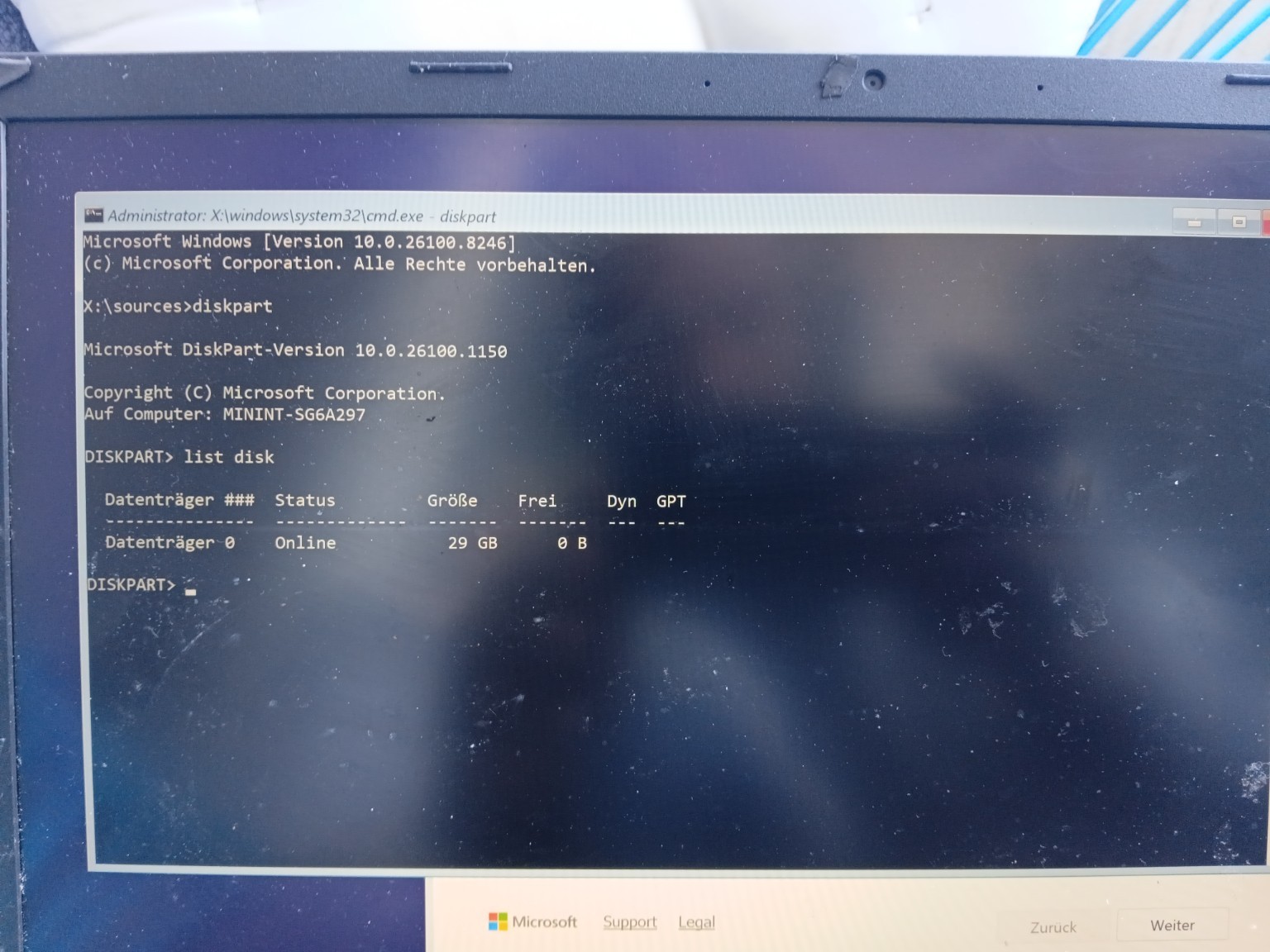
- Opened command interface with
SHIFT + F10 - Executed disk enumeration:
diskpart → list disk
Confirmed:
- installer functional
- USB visible
- internal storage not visible at OS layer
Conclusion:
“Hardware present → driver absent → system inaccessible.”
That’s not guessing.
That’s isolation.
Phase 8 — Resource Reallocation
Constraints:
- no Windows machine available
- limited budget
- time pressure
- unstable living situation
Solution:
- leveraged a MacBook for Windows recovery assets
- identified Intel RST/VMD driver requirement
- prepared for driver injection into installer environment
No ideal setup.
Just available tools.
Phase 9 — Final Barrier
System state:
- boot path functional
- installer operational
- storage inaccessible
Single point of failure:
👉 missing driver layer.
This is where most people stop.
This is where operators finish.
What This Actually Demonstrates
Not theory.
Not certification.
Execution under pressure:
- Hardware fault isolation
- Thermal-load recognition
- Layered system diagnosis: physical → driver → OS
- Improvised networking under failure conditions
- Clean rebuild decision under uncertainty
- Command-line validation of system state
- Cross-platform recovery strategy: Mac → Windows
- Identification of modern storage abstraction: Intel VMD/RST
- Continued problem-solving under personal and financial constraint
No lab.
No script.
No safety net.
The Real Principle
Perfect conditions are a luxury.
Most systems don’t fail cleanly.
They degrade across layers.
And they usually fail when life is already applying pressure.
When that happens:
- you don’t wait
- you don’t complain
- you don’t romanticize the struggle
- you don’t make the failure your identity
You operate.
Closing Line
If your system only works in perfect conditions, it doesn’t work. If you only perform in perfect conditions, neither do you.
Operational Continuity
Right now, the remaining constraint is hardware.
The system is diagnosed. The failure is isolated. The rebuild path is clear.
What’s missing is a functioning machine to execute from.
If you want to support getting this system back online and operational, you can do that here:
No pressure.
Just a direct path to restoring capability.
Pull Quotes
- “The system was compromised. Rebuild.”
- “Hardware present. Driver absent. System inaccessible.”
- “Perfect conditions are a luxury. Execution is a requirement.”
- “Systems do not fail politely. They fail when pressure is already high.”
Checkout Line
This is not a story about fixing a laptop.
This is a demonstration of how I operate when systems fail, resources are limited, and conditions are not negotiable.

Member discussion